
This project explores how digital wellbeing services can be integrated into a corporate mobile experience.

Smart Workplace Hub
01. Overview
The goal was to design a Digital Business Card, but initial research revealed a deeper need. Employees weren’t just struggling with contact sharing; they were suffering from "App Fatigue", switching between too many disconnected platforms for food, fitness, and internal communication.
Problem
Many digital business card solutions feel static and not performance-oriented. Users struggle to personalise their card while keeping it clear, engaging, and easy to manage.
Goal
Design a mobile-first digital business card experience that increases completion rate, improves engagement, and keeps the setup process simple.
My Role
End-to-end UI/UX design - from research insights and user flows to high-fidelity UI and interaction design.
04. Smart Architecture: AI-Driven Personalization
Instead of fragmented tools, I designed a centralized ecosystem where data flows between services
to create a personalized employee journey.
05. Usability Testing & Refinement
To validate the solution, I conducted usability sessions with 5 users, focusing on two main tasks:
Contact Sharing and Food Ordering.
06. Changes & Rationale
Refining the experience through user-centered iterations and usability insights.
07. Employee Feedback & Impact
User interviews highlighted significant improvements in focus, motivation, and overall satisfaction compared to standard tools.
02. From Networking to Wellbeing: Redefining the Problem
Instead of jumping straight to UI, I started by interviewing users to map their daily office journey.
I interviewed 5 internal employees to understand their pain points. The research shifted the project focus
from a simple card to a holistic workplace solution.
How do you currently share your contact information during a meeting, and what is the biggest friction point?
How many different plattaforms do you switch between to manage your office routine (food, gym, meetings)?
What moments in your office day feel the most frustrating or disorganized?
58%
Not useful for
daily work
40%
say they rarely use it
after the first setup
45%
feel the current features are too limited
Gina Silva

Age
40
Occupation
Developer
Location
Breda
TEch literate
High
Emotional State
Frustrated, impatient, overwhelmed.
Profile
Internal employee working mainly with internal teams
and tools.
Goals
•
Quickly access company-related information
•
Reduce friction in everyday micro-tasks
•
Feel organized and in control during the workday
Frustrations
•
Information scattered across too many platforms
•
Poor UX and unclear navigation in internal tools
•
Business cards feel irrelevant for daily use
Behaviors
•
Checks multiple apps (SMS, WhatsApp, email, Teams, Outlook) to find information
•
Often makes mistakes or exits unintentionally while ordering food
•
Avoids tools that feel slow or confusing
Key Pain Points Identified:
Information Fragmentation
Messages, links, and company tools are scattered across different platforms, causing constant confusion.
App Fatigue
Users feel overwhelmed by switching between multiple apps for simple tasks like ordering lunch or checking the gym schedule.
Low Engagement
Poor UX and lack of structure make it difficult for employees to stay consistent with company wellbeing programs.
Proactive Feedback Loop
Constant interaction after daily activities (like meals) ensures the adaptive engine
remains relevant.
AI-Driven Onboarding
Uses initial user data (tastes, allergies, fitness) to filter out noise and prevent
"Decision Fatigue".
The "Cross-Analysis" Hub
Integrates nutrition and activity data to provide "Balance Suggestions" for a holistic wellbeing experience.
How Might We design a digital tool that provides value to employees by improving their daily productivity and
mental wellbeing?
This logical structure transforms a simple utility app into a proactive personal assistant for the workplace.
Order Food
Fitness Program
🍽 Food Orders
🏋️♀️ Fitness Program
Overview food of the week
(base on the onboarding)
🤖 Adaptive Workout Engine
Dish Detail
Overview Lessons
🤖 Follow personal training plans
🤖 AI Onboarding food program
(for allergies and taste)
Connect your Apple watch
or smartwatch
🤖 Suggestions
Notifications after orders
Training Detail
Reserve a spot
Add to Calendar
Reminder
🤖 Feedback Dish
in the end of the day after 4 pm
🤖 AI Suggestions based on your training and notifications after your training
🤖 Cross-analyzes data between all dashboards → gives
balance suggestions.
🤖 Motivational Insights
notifications
The "Discovery" Issue: Users like Olga and Ela initially struggled to find the digital card and food menu within the dashboard hierarchy.
QR Code Accessibility: Chiara and Olga noted that the QR code needed to be more prominent to be used confidently in real-time meetings.
Information Architecture: Carlo suggested that personal profile settings and business card sharing should be separated from team-wide tools for better clarity.
The Iteration (What I changed):
Design is an iterative process. Based on user feedback, I moved away from the initial hidden menu to a more direct, gaming navigation.
Prominent QR Access: Added a persistent Floating Action Button (FAB) or a top-header icon for the Business Card to ensure it's always one tap away.
Simplified Dashboard: Reorganized the "Life at Company" section to make Food and Wellbeing services immediately visible, reducing the "clicks-to-action".
Visual Cues: Improved the iconography and labels to help non-technical users (like Olga) navigate without hesitation.

Hi Gina
Welcome to CM.com Dashboard

Food Orders
Fitness Program
Events in CM
Wellbeing
Workdays


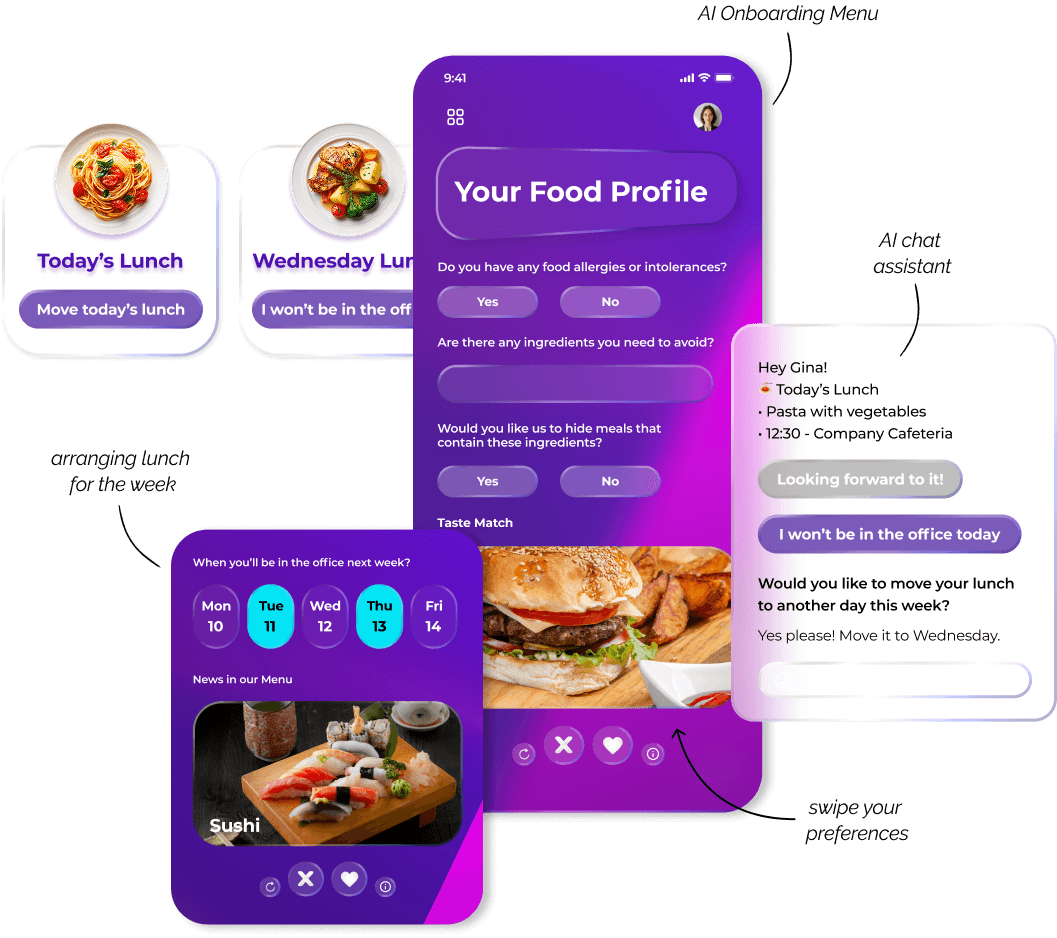
Your Food Profile
Are there any ingredients you need to avoid?
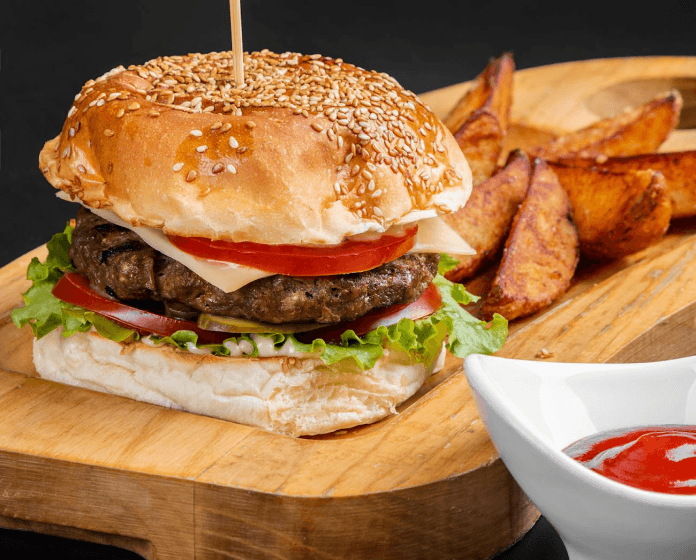
Do you have any food allergies or intolerances?
Yes
Would you like us to hide meals that
contain these ingredients?
Taste Match
No
Yes
No


From Business Card to a Daily Hub
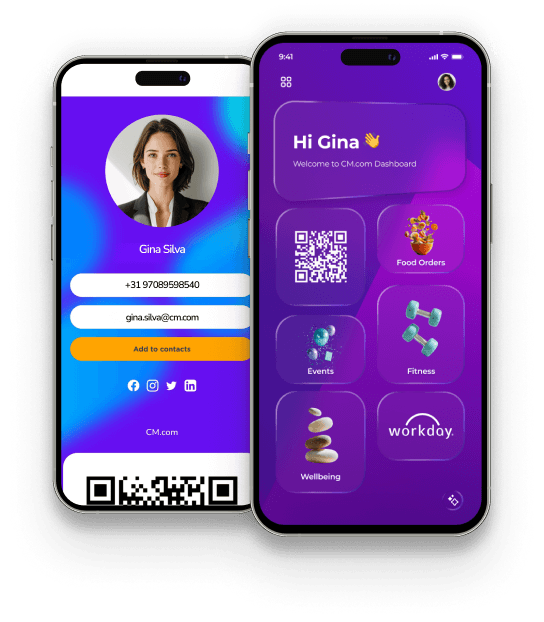
The digital business card becomes a personal dashboard a place where employees can see their daily highlights, stay motivated, and take care of themselves.
Before
After
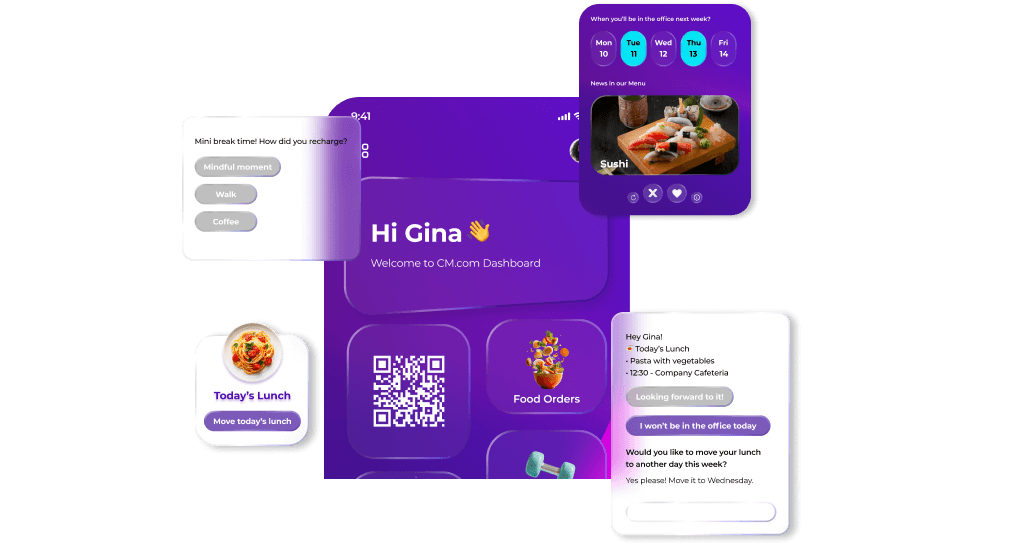
🍝 Smart Lunch Picks
AI-powered meal suggestions based on personal preferences, allergies, and office days.


Relax & Recharge
Added “Relax and Recharge” Label
Users didn’t grasp the purpose of the rotating images,
so a clear label improved clarity.

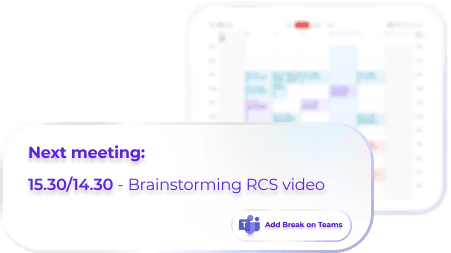
Calendar Redesign – Focus on the Next Meeting
Simplified the calendar to show just the upcoming meeting
with an “Add Break on Teams” button for clarity.
08. Accessibility & Inclusive Design
Contrast & Legibility: The color palette was tested to ensure a contrast ratio that meets WCAG 2.1 standards for accessibility.
Visual Hierarchy: Typography and spacing were optimized to provide a clear reading path for all users, including those with visual or cognitive impairments.
Touch Targets: Interactive elements are sized to be easily clickable, reducing errors and improving the experience for users with motor difficulties.
The final hub reduces 'app fatigue' by centralizing core office services into a single, intuitive AI-driven experience.
Through competitive analysis and early validation, I identified
recurring friction points in existing digital card experiences.
Before designing the interface, I mapped the primary user journey to identify friction points and guide design decisions that reduce drop-off.
The UI was designed to balance clarity and personalisation. Every component follows a modular structure to reduce cognitive overload while keeping the experience visually engaging.
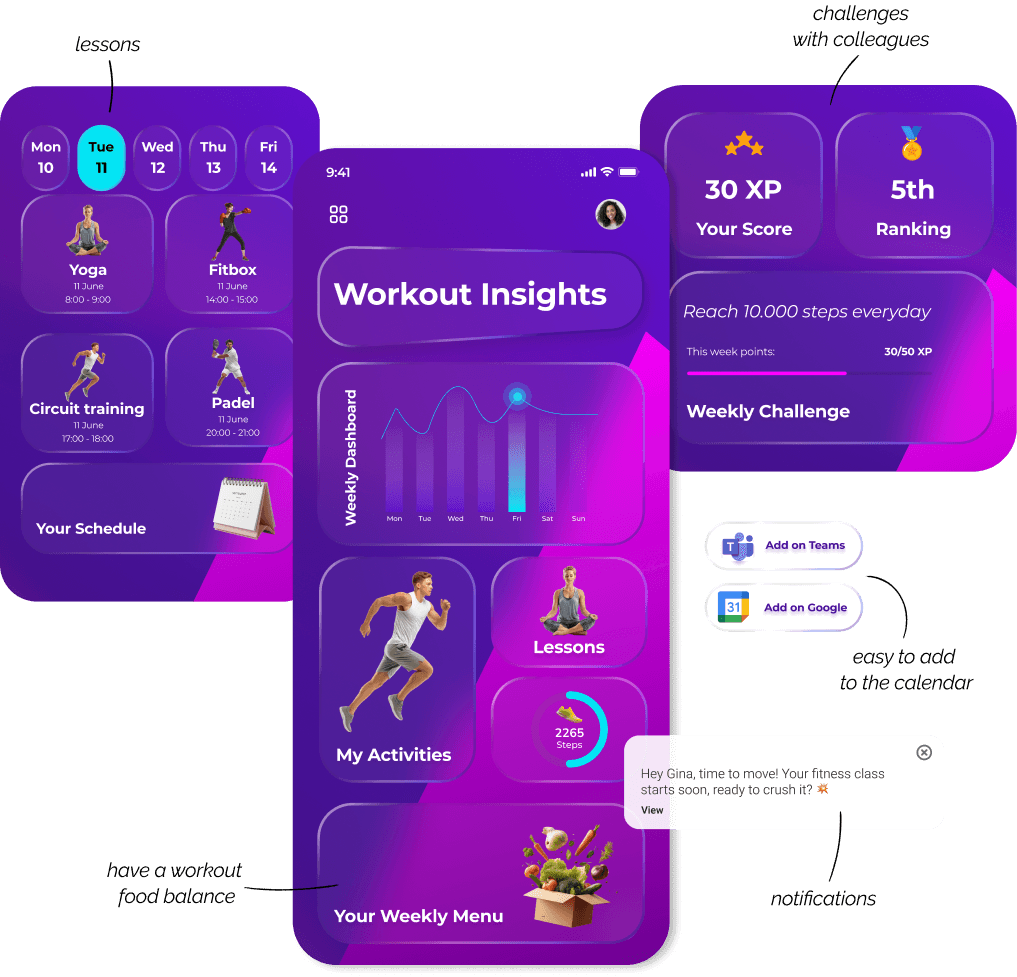
🏋️ Fitness Experience
Adaptive workouts suggested by AI, tailored to energy levels and available time.
*Progress-focused design encourages consistent engagement.
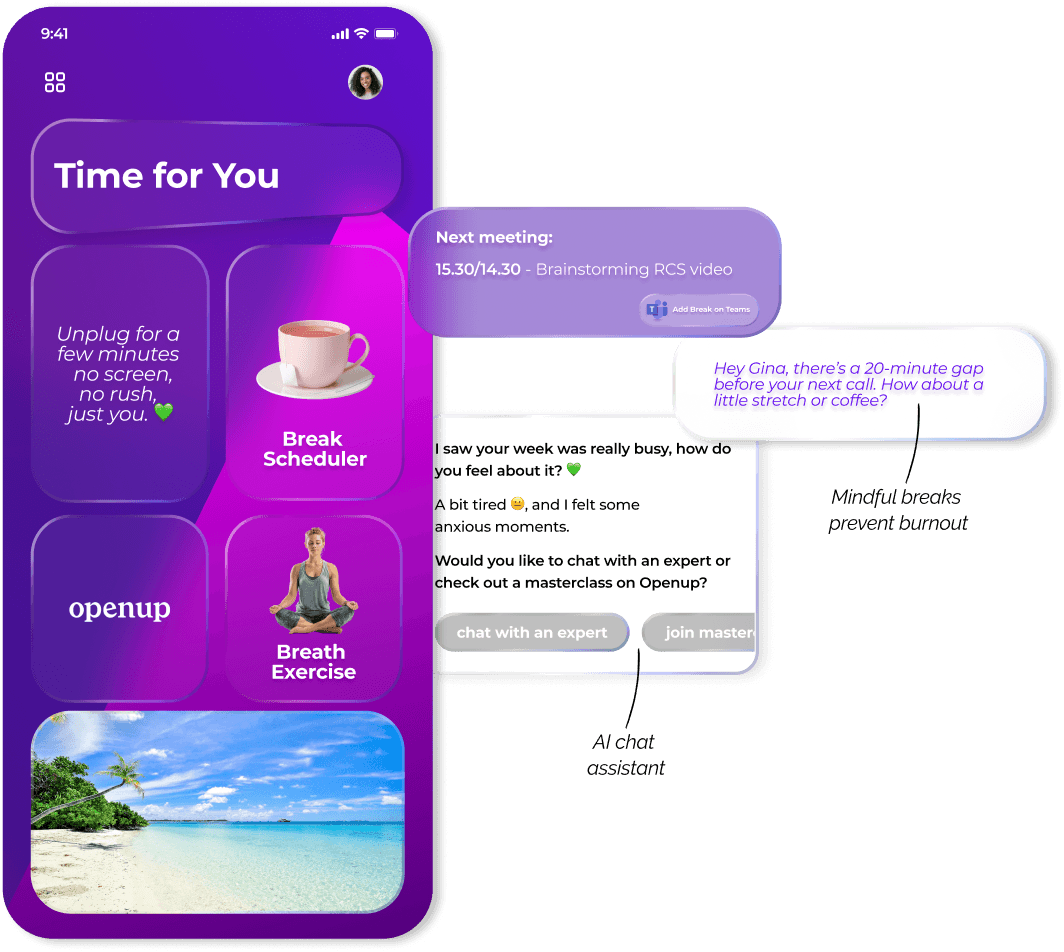
💖 Mindful Breaks
AI detects stress patterns and suggests mindful breaks at the right moment.
*Content is prioritised to encourage quick, restorative moments.
*Personalised suggestions simplify daily lunch planning.
80%
Reported feeling more focused.
70%
Stated it boosted motivation.
90%
Found it "refreshing"
compared
to standard tools.
Key takeaways
Human-centred productivity
A small everyday tool, when redesigned around real employee needs, can meaningfully reduce stress, improve focus, and create healthier work habits.
Less overload,
more clarity
Simplifying information can empower employees to manage their day with ease and confidence.
A smarter way to support wellbeing at work
When design prioritizes wellbeing, even a simple business card can become a meaningful companion in the workday.